Where the label sits on a Flipkart sheet
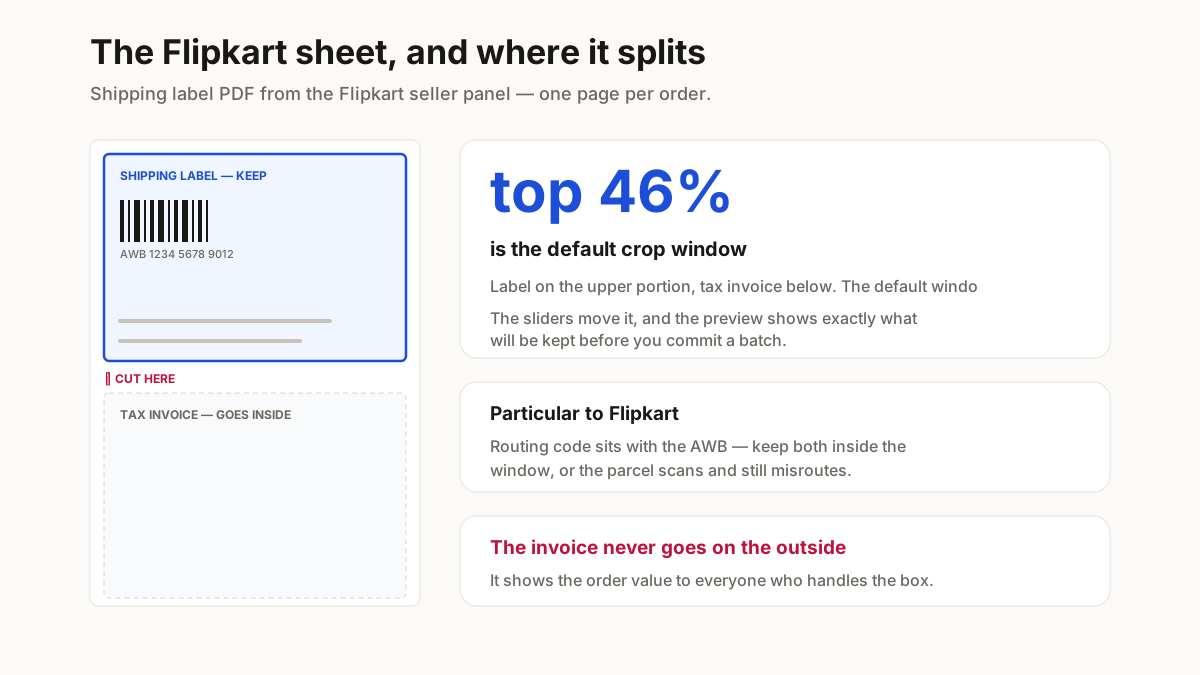
Flipkart’s panel gives you one A4 page per order carrying two things: the shipping label on the upper portion and the tax invoice below it.
Only the label goes on the parcel. The invoice goes inside it, or is kept for your records — it is not a shipping document, and putting it on the outside displays the order value to everyone who handles the box.
The default window takes the top 46% of the page, which clears the label with a few millimetres of margin on a standard Flipkart sheet. If your panel emits a different layout, the sliders move the window and the preview shows exactly what will be kept.
What must survive the crop
The AWB barcode is the one that matters — it is what the hub scans, and a crop that clips it or its quiet zone makes the parcel unscannable. Above it sit the courier name and routing code; below, the delivery address and order ID.
Check the barcode is comfortably inside the blue window before running a batch. A few extra millimetres of white space costs nothing; a clipped barcode costs the delivery.
Who ships it changes what you get
Worth establishing first, because it decides whether this tool is relevant to you at all.
If Flipkart holds your stock and ships it, you never see a shipping label — the fulfilment centre generates and applies it, and your job ended when the inbound consignment was received. Nothing here applies.
If you hold your own stock and dispatch it yourself, the panel gives you the label and the tax invoice on one A4 sheet per order, and cropping that sheet is a daily job. That is who this page is for.
The invoice is not a shipping document
It goes inside the parcel or into your records. Taping the whole sheet to the outside puts the order value on display for everyone who handles the box — and on a route where parcels are handled a dozen times, that is a category of loss you can simply remove.
Printing a Flipkart label so it scans
A label that reads perfectly on screen and fails at the hub costs the delivery and usually the customer too. Five checks cover almost all of it.
| Do this | Because |
|---|---|
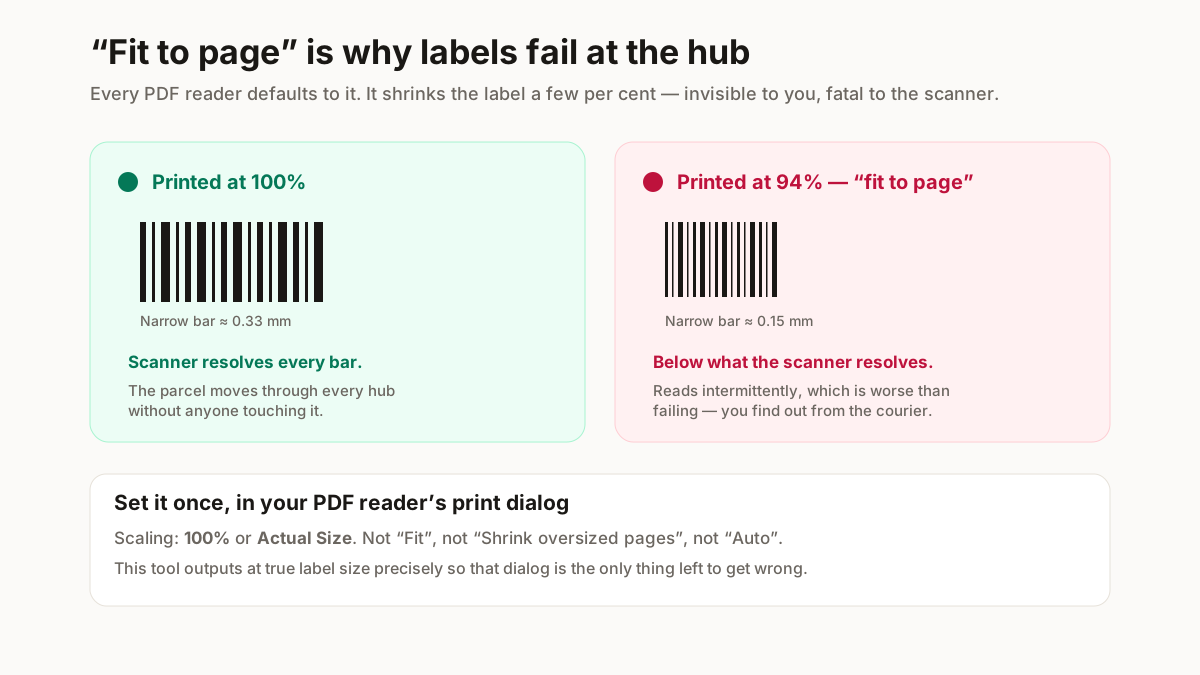
| Print at 100%, never "fit to page" | Scaling shrinks the barcode modules below what the hub scanner resolves. This is the single most common cause of a rejected parcel. |
| Thermal, not inkjet, if you can | Inkjet smudges in transit and in humidity. A thermal print survives a monsoon delivery; an inkjet one often does not. |
| Check the barcode is fully inside the crop | A barcode clipped at the edge scans as nothing. The preview shows the exact window before you commit a batch. |
| Keep the quiet zone | Barcodes need clear space either side. Cropping tight to the bars is the same as damaging them. |
| Do not photocopy labels | Each generation loses contrast, and the AWB barcode is the first thing to become unreadable. |
Print at 100%. “Fit to page” is the default in every PDF reader, and the shrink it applies is small enough that you will not notice it and large enough that a scanner will.
The one particular to Flipkart: the sheet carries a routing code alongside the AWB, and pickup staff sort against it by eye. A crop that preserves the barcode but clips the routing code will scan cleanly and still be misrouted — which takes far longer to diagnose than an outright rejection, because nothing appears to have gone wrong.
Why this runs in your browser
A shipping label is not a neutral document. It carries your customer’s full name, complete address and phone number — for every order on the sheet.
Uploading a morning’s labels to a free online cropper hands a stranger a list of your customers, with contact details, in a format built for direct marketing. Most of those sites are ad-funded and none of them tell you what happens to the file.
This one does the work on your own machine. The PDF is read into the browser tab, cropped there and written back out. Nothing is uploaded, so there is nothing to retain, leak or sell.
Related free seller tools
Frequently Asked Questions
Where do I download the Flipkart shipping label?
From the Flipkart seller panel under orders — select the orders you are dispatching and download their labels as one PDF. That is the file this tool takes, and every page in it gets the same crop.
Do I have to include the tax invoice on the parcel?
The invoice belongs inside the parcel or in your records, not stuck to the outside. Putting it on the exterior displays the order value to everyone who handles the box, which is the last thing you want on a COD shipment.
The crop is cutting off part of my label. What do I change?
Increase the Height slider a few per cent and check the preview. Flipkart has changed its sheet layout before, so a label that used to sit in the top 46% may now need 50%. The window is adjustable rather than hardcoded for exactly this reason.
Can I crop a batch of Flipkart labels in one go?
Yes. Select the orders in the panel, download the labels as one PDF, and every page gets the same crop window. Forty orders becomes one operation instead of forty. Check the preview on the first page before committing a large batch.
Does this work if Flipkart fulfils my orders?
No, and you will not need it. If Flipkart holds and ships your stock, the fulfilment centre generates and applies the label — you never see one. This is for sellers who hold their own stock and dispatch it themselves.
What is the routing code on a Flipkart label?
A destination hub code that pickup and sortation staff read by eye, separate from the AWB barcode the scanner reads. Keep it inside your crop: a label that scans but loses the routing code can still be misrouted, and that is slower to diagnose than a clean rejection.
Is this label cropper free?
Yes, with no signup and no watermark. It runs in your browser using a client-side PDF library, so there is no upload queue and no per-label cost.
Do you see my customers’ addresses?
No. The PDF is opened, cropped and saved inside your browser tab — it is never sent anywhere. That matters more here than on most tools, because a shipping label carries a customer’s full name, address and phone number.
Print at 100%, and check the barcode is inside the crop. Those two things account for nearly every label that fails to scan at the courier hub, and both are free to get right before you print a batch of forty.