Where the label sits on a Meesho sheet
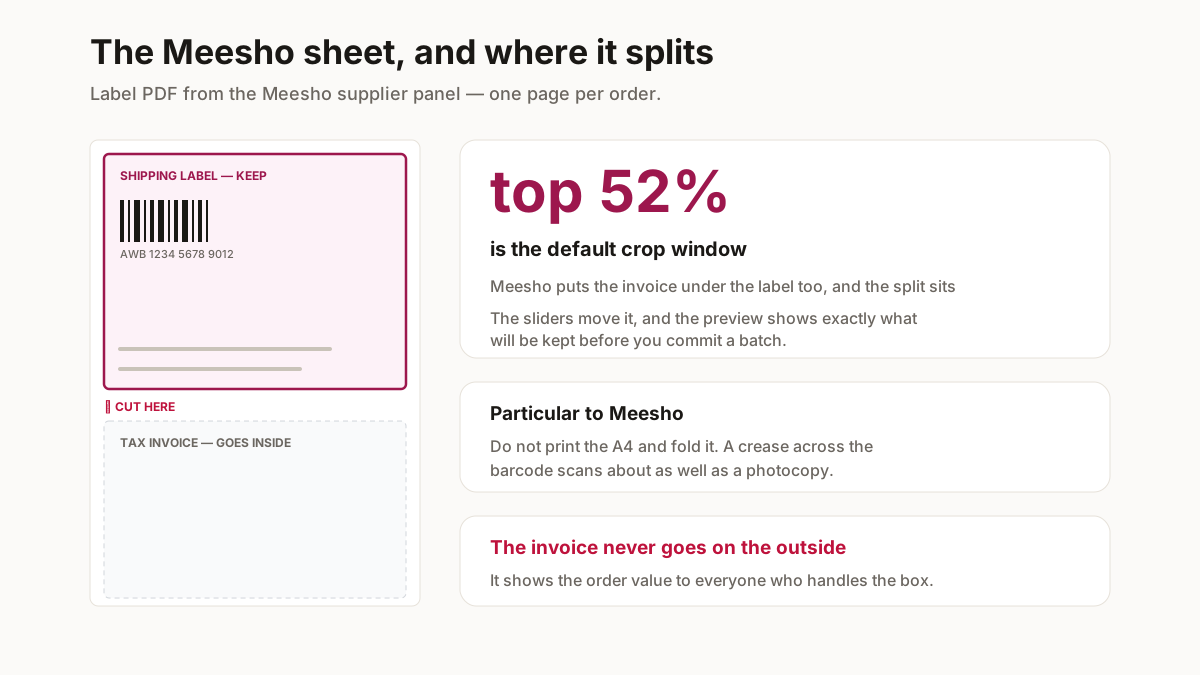
The Meesho supplier panel gives you a label PDF where each page carries the shipping label above and the tax invoice below — the same shape as Flipkart, but the divide falls a little lower down the page.
That is why the Meesho preset takes the top 52% rather than 46%. Using the Flipkart window on a Meesho sheet clips the bottom of the address block, which is the sort of error you only notice after printing thirty of them.
Getting the labels out of the panel
Labels download per batch of orders rather than one at a time, which is what makes cropping worth automating — a morning’s dispatch is one PDF with forty pages, and this turns it into forty thermal-ready labels in a single pass.
If the panel is not where you expected, the supplier panel guide maps each section — including the fact that Meesho says supplier where every other marketplace says seller.
Batching a day of Meesho dispatch
The supplier panel does not hand you labels one at a time, and that shape is what makes cropping worth automating at all.
Select the orders you are packing, download the labels, and the panel returns one PDF with a page per order. Forty orders is one file. Cropping that by hand in a PDF reader is forty separate operations and about twenty minutes; here it is one pass, because the same window applies to every page.
Do it before the pickup window, not during
Meesho pickups run to a route, and the rider will not wait. Print the batch in the morning, stick the labels, and stack the parcels by the door before the window opens. Labelling while a rider stands there is how the wrong label ends up on the wrong bag — which becomes two failed deliveries and two returns, both counted against you.
Keep the invoices
The half you crop off is a tax document. Cropping does not delete it — the original PDF is untouched on your machine — but it is worth filing the batch rather than discarding it, because that is the record your accountant works from at year end.
Printing a Meesho label so it scans
Meesho runs high volume on thin margins, and a parcel rejected at the hub costs the freight twice over before you have sold anything. Five things account for nearly every failure.
| Do this | Because |
|---|---|
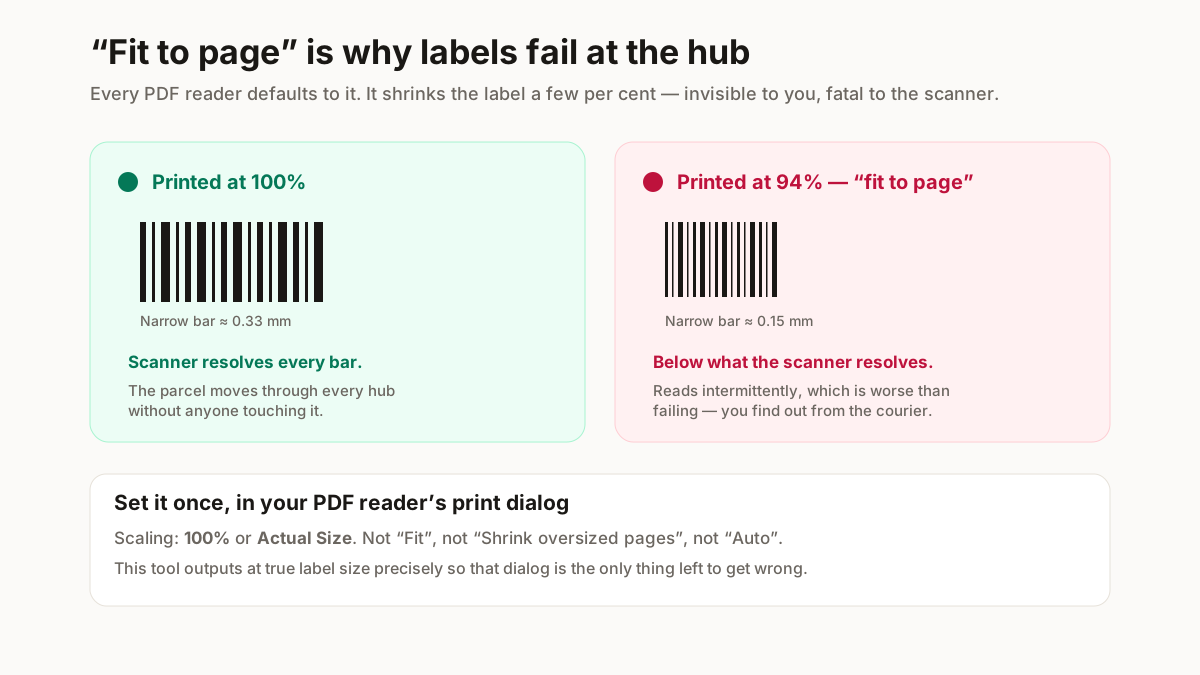
| Print at 100%, never "fit to page" | Scaling shrinks the barcode modules below what the hub scanner resolves. This is the single most common cause of a rejected parcel. |
| Thermal, not inkjet, if you can | Inkjet smudges in transit and in humidity. A thermal print survives a monsoon delivery; an inkjet one often does not. |
| Check the barcode is fully inside the crop | A barcode clipped at the edge scans as nothing. The preview shows the exact window before you commit a batch. |
| Keep the quiet zone | Barcodes need clear space either side. Cropping tight to the bars is the same as damaging them. |
| Do not photocopy labels | Each generation loses contrast, and the AWB barcode is the first thing to become unreadable. |
Print at 100%. Every PDF reader defaults to “fit to page”, which shrinks the label a few per cent — invisible on screen, and enough to push the barcode’s narrow bars below what a hub scanner resolves.
The trap particular to Meesho: because the panel puts the invoice on the same sheet, sellers print the whole A4 and fold it so only the label faces out. That works until the fold crosses the barcode, and a creased thermal print scans about as well as a photocopy. Cropping properly removes the temptation.
Why this runs in your browser
A shipping label is not a neutral document. It carries your customer’s full name, complete address and phone number — for every order on the sheet.
Uploading a morning’s labels to a free online cropper hands a stranger a list of your customers, with contact details, in a format built for direct marketing. Most of those sites are ad-funded and none of them tell you what happens to the file.
This one does the work on your own machine. The PDF is read into the browser tab, cropped there and written back out. Nothing is uploaded, so there is nothing to retain, leak or sell.
Related free seller tools
Frequently Asked Questions
Where are shipping labels in the Meesho supplier panel?
Under orders, where you select the orders you are dispatching and download their labels as one PDF. The supplier panel guide has a map of each section if you cannot find it.
Why is the Meesho preset different from the Flipkart one?
Because the split between label and tax invoice falls slightly lower on a Meesho sheet. Using the Flipkart window clips the bottom of the address block — a mistake you tend to discover after printing a batch.
Can I print Meesho labels on plain A4 paper?
Yes, though A5 or a 4×6 thermal roll is better. On plain paper print at 100%, cut to the label, and fix it to the parcel inside a clear pouch so it survives handling and rain.
Do I need a thermal printer for Meesho labels?
No, but it pays for itself fast if you dispatch daily. There is no ink to replace, and a thermal print survives humidity and handling in a way an inkjet one does not. Until then print on A5 or plain paper and tape it on inside a clear pouch.
Can I crop a whole day of Meesho orders at once?
Yes, and that is the point. The supplier panel returns one PDF with a page per order, and the same crop window applies to every page — so forty orders is one pass rather than forty. Check the preview on page one before running a large batch.
What size should a Meesho label print at?
Four by six inches, which is the standard thermal roll and what the courier partners expect. The metric 100 by 150 mm equivalent is fractionally shorter and works identically.
Is this label cropper free?
Yes, with no signup and no watermark. It runs in your browser using a client-side PDF library, so there is no upload queue and no per-label cost.
Do you see my customers’ addresses?
No. The PDF is opened, cropped and saved inside your browser tab — it is never sent anywhere. That matters more here than on most tools, because a shipping label carries a customer’s full name, address and phone number.
Print at 100%, and check the barcode is inside the crop. Those two things account for nearly every label that fails to scan at the courier hub, and both are free to get right before you print a batch of forty.