What are the real reasons a Meesho catalog gets rejected?
Image rules first, and they account for roughly 70% of rejections: branding on the primary shot, dimensions under 500x500 px, a background that is not clean, or a photo lifted from a supplier catalogue that another seller already uses. Those cover most rejections.
Then category and attribute mismatches — a product listed against the wrong category, or mandatory attributes left blank. These clear in under 10 minutes once you know which one fired. These are quick to fix once you know which one triggered.
Then the harder ones: suspected counterfeit, or a claim in the title the images do not support. Those need the listing rewritten rather than the photo swapped.
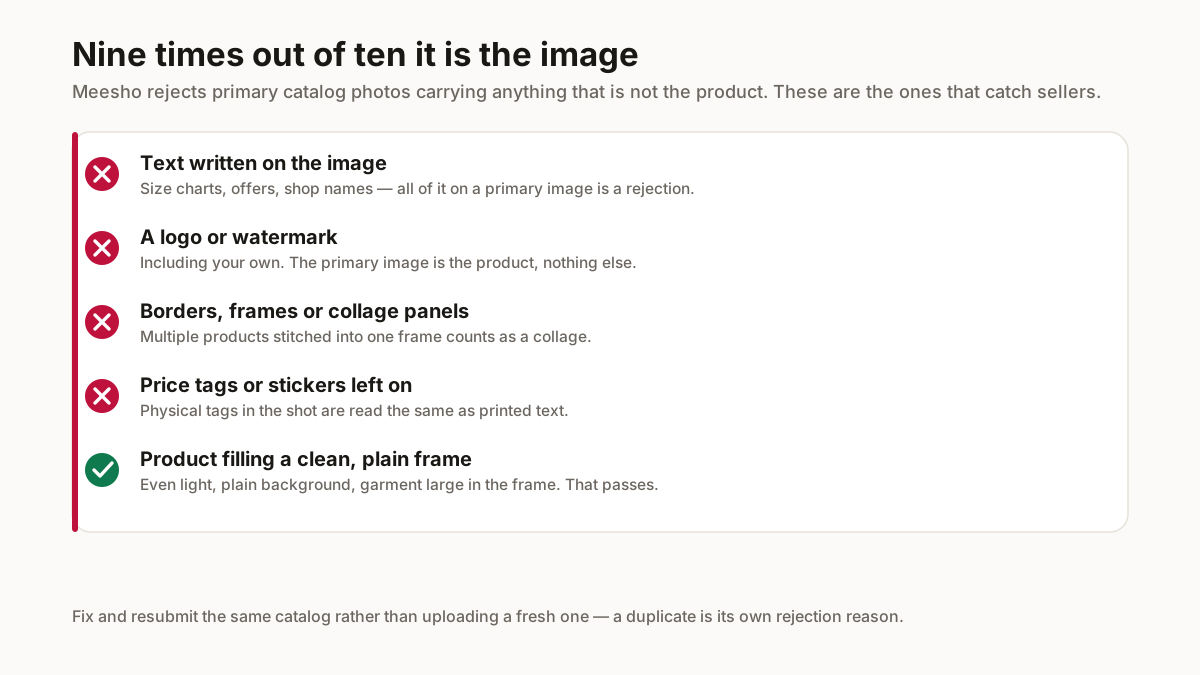
How do you fix an image rejection specifically?
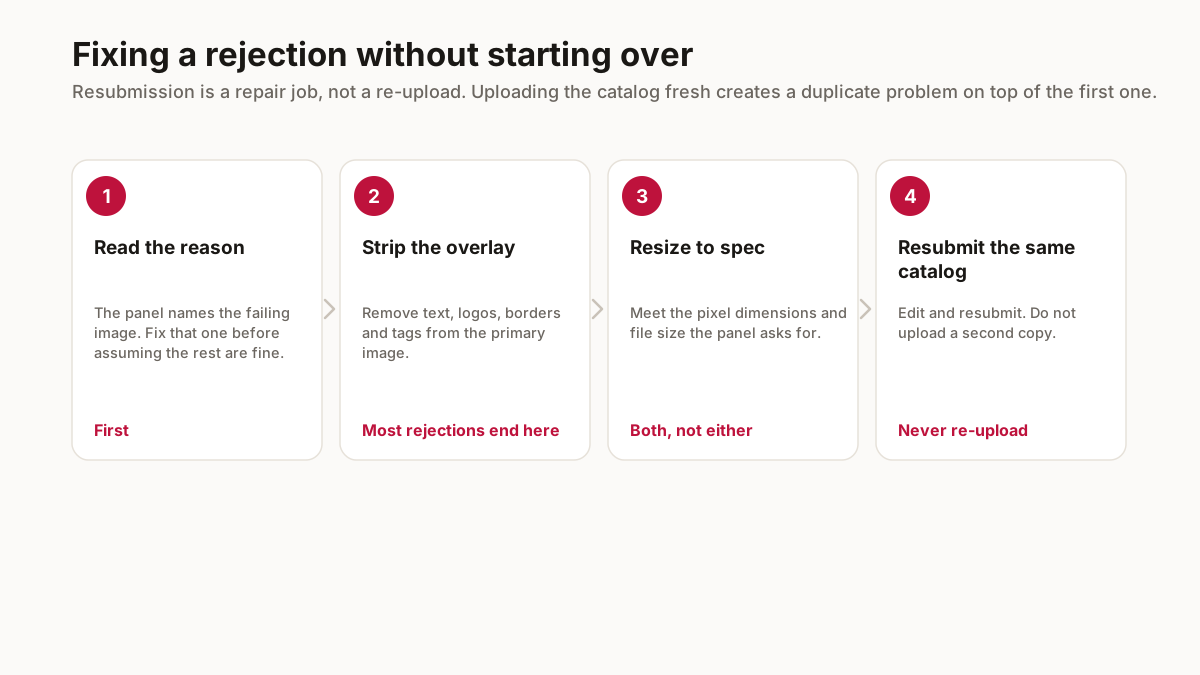
Strip every overlay from the primary image — all 1 of them, if you have added a shop name. No shop name, no watermark, no SALE badge, no price. Those belong on the copies you send to WhatsApp and Instagram, never on the catalog hero.
Resize to 1000x1000 square. Meesho accepts 500x500 as a minimum but shows higher-resolution images more prominently, and the extra pixels cost nothing.
Use a clean background. Pure white is safest, and a photo shot on a white bedsheet in daylight is usually 1 background removal away from passing.
What should you do after a second rejection?
Stop resubmitting the same catalog. A repeated rejection on the same product means you have misread which rule fired, and another upload spends another 24 to 48 hours of QC time.
Test with 1 product and not the batch. Fix a single listing, submit it alone, and see whether it clears — that isolates the cause in 1 QC cycle over 5.
If the rejection mentions authenticity rather than image quality, treat it seriously. That path leads to account action not another rejection, and it needs documentation instead of a better photo.
How do you read the rejection reason properly?
Start by finding which image failed, not which catalog. The panel identifies the specific photograph, and sellers who skip that step reshoot everything — including the four images that were fine — which turns a twenty-minute fix into an afternoon.
Then take the reason literally. A rejection citing text on the image means text on the image, including a size chart you thought was helpful and a shop name you thought was branding. It does not mean the photograph was poor quality, and reshooting a compliant photo more beautifully will produce the same rejection.
Where the reason is genuinely ambiguous, work through the checklist in order: anything written on the primary image, any logo or watermark, any border or frame, any collage of multiple products, any physical tag or sticker in shot. That covers the overwhelming majority of rejections without needing to guess.
Keep the rejected version. Comparing it against what you resubmit is how you learn which specific thing was the problem, and that knowledge saves the next twenty catalogs.
Why does resubmitting beat re-uploading?
Because a fresh upload of the same product creates a duplicate, and duplication is itself a rejection reason. A seller who reacts to one problem by creating a second one now has two catalogs in trouble and no clear way to tell which is which.
Resubmission also keeps whatever history the catalog has accumulated. A catalog that has been live, even briefly, carries signals that a brand new one does not, and discarding those to avoid a small edit is a bad trade.
The edit itself is usually small. Most rejections are one image with one thing on it, and replacing that single photograph while leaving the rest of the catalog intact is both faster and safer than rebuilding.
If you have already uploaded a duplicate by mistake, deal with that before resubmitting anything. Two catalogs for one product will keep causing problems long after the original image issue is resolved.
Related free seller tools
Frequently Asked Questions
Why is my Meesho catalog rejected?
Most often the image — a logo, watermark, promotional text or price tag on the primary shot, wrong dimensions, or an unclean background. Category and attribute mismatches are the next most common cause.
What image size does Meesho require?
1000x1000 pixels square is recommended. The minimum accepted is 500x500, but higher-resolution images are shown more prominently and the larger size costs nothing.
Can I put my shop name on Meesho catalog images?
Not on the primary catalog image — it will be rejected. Keep branded copies for WhatsApp and Instagram, and send the marketplace a clean version.
What should I do if my catalog is rejected twice?
Stop resubmitting the batch. Fix one product, submit it alone, and see whether it clears — that isolates the actual rule in one QC cycle rather than five.
What if the rejection mentions counterfeit?
Treat it seriously and gather documentation over resubmitting a better photo. That path leads towards account action in place of another rejection.
Should I upload a new catalog after a rejection?
No. A fresh upload of the same product creates a duplicate, which is its own rejection reason, and you discard whatever history the catalog had. Edit the failing image and resubmit the same catalog.
The rejection reason is vague. What do I check?
Work the checklist in order on the primary image: anything written on it, any logo or watermark, any border or frame, any collage of several products, any physical tag or sticker in shot. That covers the large majority of rejections.
Rates, slabs and penalties change. Check the current figures in your supplier panel before pricing — the mechanics above stay stable, the numbers do not.